How To Make Apps Go To Sd Card / Windows 10 Mobile Install Move Apps To Microsd Card How To - Similarly, link the other apps to the sd card and this will transfer a huge percentage, approximately 60% of the application into the sd card.
Dapatkan link
Facebook
X
Pinterest
Email
Aplikasi Lainnya
How To Make Apps Go To Sd Card / Windows 10 Mobile Install Move Apps To Microsd Card How To - Similarly, link the other apps to the sd card and this will transfer a huge percentage, approximately 60% of the application into the sd card.. If you don't see the change option, the app cannot be moved. Tap change if it's there. When i format, the only options i am offered are cancel or format sd card (which initiates the process). Then you can do the below: Tap on the app you want to move to sd card and look for storage. after tapping on storage, you'll be able to see the storage location of the app and how much space it is taking.
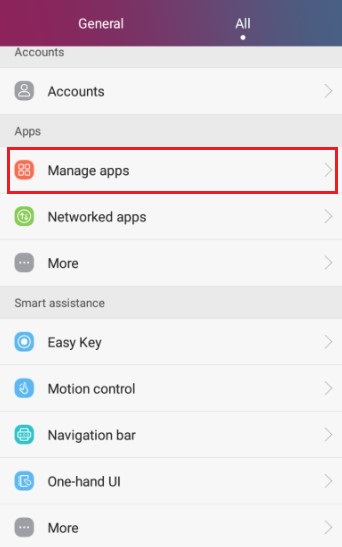
If you want to move other apps to your sd card, you should repeat the above steps. How to backup and restore whatsapp chat, media using google drive Find an app you want to move to your sd card and press it. All you need to do to get started, is to go to settings and look for application manager under the more tab. Here, you can choose the app you want to move by tapping on it and you will get a few options, including the move to sd card button.
How To Move To Sd Card On Android Free Up Internal Storage from www.techadvisor.com Expanding your pc's storage if you have a windows 10 tablet or laptop pc with a small amount of storage, an sd card may be the ideal way to expand its storage —both for apps and other types of content. Tap on the app you want to move to sd card and look for storage. after tapping on storage, you'll be able to see the storage location of the app and how much space it is taking. Tap change if it's there. Some devices allow you to choose from two storage options: I use number 3 and i test on 1gb sd, thats means 900 mb goes to internal storage for moving app, and other 100 mb stay like normal sdcard and i can use it as storage for file! Tap on any of the apps that you want to store on sd card. If you don't reboot the phone, many things may not work correctly, so make sure you do. How to backup and restore whatsapp chat, media using google drive
There may be apps claiming to do that, but i haven't tried any, so i cannot tell.
And, when you have successfully moved the app to sd card, you cannot make it work when you remove the sd card. A menu will open up. If you want apps to save their data files (such as the cache) to your sd card in addition to apps, select use as an internal storage for both apps and data. If you only want apps to be stored on the card, select use as internal storage for apps only. You can just go to settings > applications, and select the app you want to move to your sd card. More features about samsung messages backup: In application manager, swipe to the left once to access a full list of apps that can be moved to the card. How to move apps to sd card to move an app to the sd card, open the settings screen, tap applications, and select manage applications. After update, you have to manually move the app. The application manager offers the easiest way to send apps from the device to your sd card. Using move apps to sd card, you can select all apps (supported) that you wish to move to sd card to free up space on internal. It's a brand new card. How to backup and restore whatsapp chat, media using google drive
You will not be able to store every app on sd card. Adoptable sd card is an android feature that allows an external sd card to be used as internal storage. After upgrading to marshmallow your android device is running out of space?below video will show you:how to transfer apps and games to your sd card to free. Then, you can see the move to sd card button. After update, you have to manually move the app.
How To Move Apps To Sd Card On Huawei from imobie-resource.com Depending on the size of the app. A menu will open up. And, when you have successfully moved the app to sd card, you cannot make it work when you remove the sd card. Now for our actual tutorial: If you absolutely must do so, go to settings > storage & usb. Find an app you want to move to your sd card and press it. How to move apps to sd card: Here, you can choose the app you want to move by tapping on it and you will get a few options, including the move to sd card button.
To move an app, go to settings > apps > select app > storage > change > sd card.
Expanding your pc's storage if you have a windows 10 tablet or laptop pc with a small amount of storage, an sd card may be the ideal way to expand its storage —both for apps and other types of content. This will clear a decent amount of space of the internal storage on the phone. Instead, once you've installed an app, you can see if it can be moved to the sd card. Just tap the sd card storage option in your storage settings, choose apps & games on the following screen, and then you'll see a list of sd card compatible apps that are installed on the card. Not all phones or apps will allow this through the ui so if you don't see. Your sd card will now be formatted as internal storage. The data stored on an adopted card is encrypted and it can't be mounted on any other device. Go into apps & notifications. It formats successfully, but nothing changes as far as being able to move apps to the card. Similarly, link the other apps to the sd card and this will transfer a huge percentage, approximately 60% of the application into the sd card. You just need to click this button to move the selected app to the sd card. Select an app you want to move to the microsd card. What you need to save to an sd card on android
In this video i show you how to put the memory card as internal storage on your android phone and also i show how to move all apps and games over to the sd c. If you want apps to save their data files (such as the cache) to your sd card in addition to apps, select use as an internal storage for both apps and data. You do not need to specify where to store content for each app. If you don't see the change option, the app cannot be moved. You can just go to settings > applications, and select the app you want to move to your sd card.
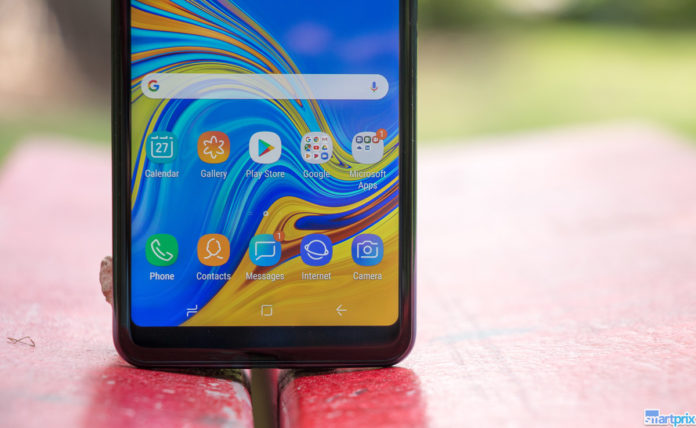
How To Move Or Install Apps On Sd Card On Samsung Phones Smartprix Bytes from www.smartprix.com Using move apps to sd card, you can select all apps (supported) that you wish to move to sd card to free up space on internal. If you don't see the change option, the app cannot be moved. If you don't reboot the phone, many things may not work correctly, so make sure you do. Then, you can see the move to sd card button. This will clear a decent amount of space of the internal storage on the phone. Select a storage option and tap next. You can just go to settings > applications, and select the app you want to move to your sd card. If you are unable to.
An sd card (inserted in your phone) drivers for your phone (check phone manufacturers site) java tm platform, jdk installed (download from here) android sdk (download and install instructions) that's it.
Your sd card will now be formatted as internal storage. How to turn the external sd card into internal storage on nougat a.k.a. Select your sd card or other drive in the new apps will save to option under save locations. A secondary internal hard drive or partition will work fine, but you can also use this trick to store apps on an sd card or usb drive. Simply press on it and the transferring process will begin. Move apps to the sd card ① tap settings > storage . This will clear a decent amount of space of the internal storage on the phone. To move an app, go to settings > apps > select app > storage > change > sd card. It formats successfully, but nothing changes as far as being able to move apps to the card. When the card is converted to. More features about samsung messages backup: Not only apps, you can also transfer music, pictures, videos and documents to sd card by this way! Tap the move to sd card button if there is one.
How To Make Something Pop Out Of A Card : How To Make A Greeting Pop Up Card For Mom| Birthday ... : The cuts should be max half the length of the card (otherwise they'll stand out when you close it). . The card can be made in three styles with one being fun, another being brassy, and the last is a new year invitation. It's going to stop it from pulling all the way out of the base page. Make the first cut about 1 inch from the bottom of the card. See more ideas about cards, cards handmade, pop up cards. It's such a fun card and who doesn't love a card that moves! Open the card and fold tabs inward. Choose what will go on each tab—you can either print the images we provided or draw your own. When the card is opened, a heart will spring out and bring delight! The wow starts when they open the card and the message just pops out from the middle. Secure the second piece of paper to the card with the pop up. ...
How To Make Earring Cards / Easy Earring Cards Home Facebook : Materials you will need · avery 5371 laser perf business cards · hole punch 1/16th or 1/8th inch · small scissors. . Another question…can you do a tutorial on how to make personalized earring cards such as each card having a different name and information. These are super simple, but as we just read, can have a huge impact on the presentation of your crochet earrings that. In this video tutorial, i show how to make beautiful cards for your earrings with scrapbook paper, a thumbtack, and a few things you probably have laying around in your craft room! Afterwards, i received several requests to write a tutorial on making the actual earring cards. Guidecentral is a fun and visual way to discover diy ideas, learn new skills set of 20 hand made, hand stamped earrings holders/cards. The front of my cards have my jewelry business name, type of metal, and other components used in the earrings. An easy to make, di...
How To Make Multiplication Flash Cards : MATH : Fold each card along the fold line. . Cut pages into halves as shown on the cards. For instance, flash cards can be purchased each on and offline from numerous stores; Then we started using them. A blank sheet is included to make your own or quickly replace a lost/destroyed c. Free printable multiplication flash cards pdf 0 10. A smart algorithm is implemented so that easy questions such as 10*10 or 11*10 will be rarely asked. Then we started using them. Type out what you want the card to say and press ctrl + enter to create a new card. The importance of create multiplication flash cards flash card units, as you likely know, can be bought from a lot of merchants. For example, 4+2 would be. Other Products | Multiplication.com from www.multiplication.com Hi friends, in this video we are sharing with you th...



Komentar
Posting Komentar